
1\. Introduction
1. Introduction
Section titled “1. Introduction”This document outlines the onboarding procedure for Microsoft Purview, providing guidance to teams on the creation and publication of data products.
In Microsoft Purview, data products are formed by logically grouping Assets and are organized into meaningful governance domains. Within a specific governance domain, Data Product Owners and Data Stewards are authorized to create and manage these data products.
Purview Components: Microsoft Purview comprises two principal components for data cataloging, which function cohesively to offer a comprehensive overview and management of an organization’s data.
- Unified Catalog serves as a centralized, searchable repository for all data assets and their associated metadata.
- Data Map is a tool allows Data Producers to capture metadata from various data sources. Its primary functions include registering, scanning, and curating data Assets.
The following sections outline the process of creating and publishing data products to the governance domain.
To access the Purview Consumer Onboarding Training Document, please refer to the relevant How-to Guide
2. Purview Unified Catalog - Key Roles
Section titled “2. Purview Unified Catalog - Key Roles”The following outlines key roles within Purview, which also conceptually represent the access levels crucial for the successful implementation of Data as a Product (DaaP) across any catalog.
By default, all Purview Users have read-only access to all content within the Unified Catalog.
Data producers who intend to create and publish data products are requested to contact governance domain owners to obtain necessary permissions( i.e. Data Product Owner or Data Curator Role) within the governance domain.
To request a new governance domain or for additional assistance, please contact us by submitting a Support Request. When submitting, select BI/Datawarehouse for the application and Microsoft Purview for the module.
Key Roles:
-
Global Catalog Reader: A high-level role for discovering available data without requiring direct access.This role facilitates the searching and locating of published data products within the Unified Catalog.
-
Local Catalog Reader: Can view published concepts only in the governance domain they are explicitly added to.
-
Data Product Owner (DPO): This Role functions like a “mini-CEO” of a data product. This role involves defining the necessity and purpose of data products, with a strong emphasis on achieving specific business outcomes.
-
Data Curator: Focused on the quality, discoverability, and integrity of individual data assets within the Purview Data Map and Unified Catalog. They are the “librarians” or “catalogers” of data and ensure underlying data assets are well-described, accurate, and discoverable.
-
Data Quality Steward: Responsible for generating and managing data quality metrics and rules. This role has permissions to create, read, modify, and delete data quality rules, as well as configure and run data quality scans.
3. Data Asset lifecycle management
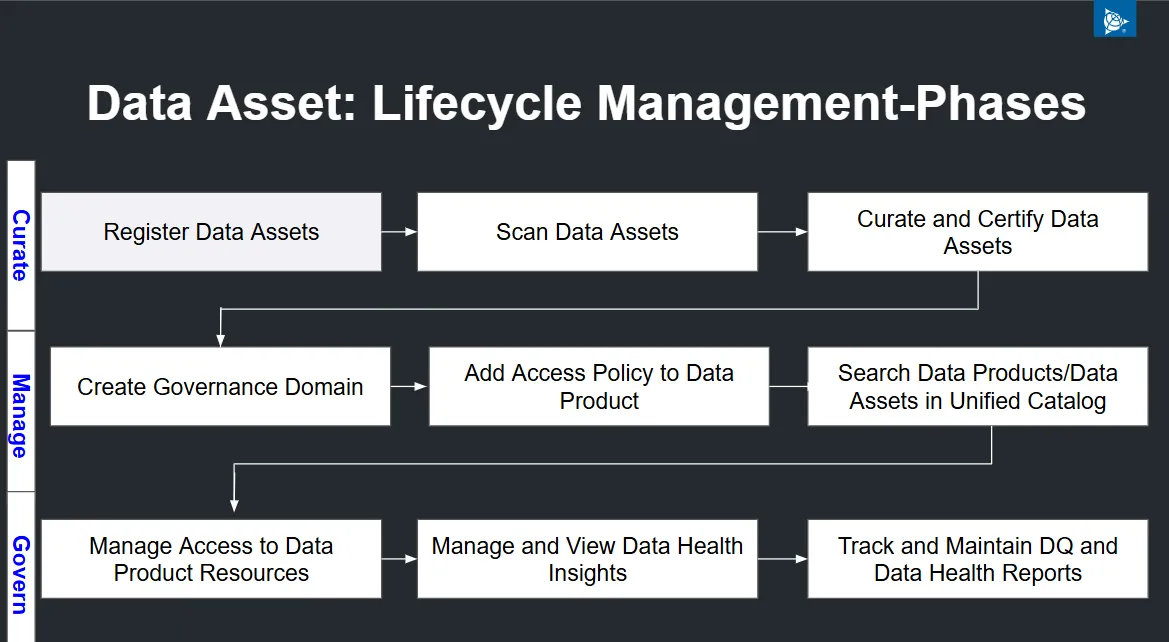
Section titled “3. Data Asset lifecycle management”Data Asset Lifecycle Management in Purview is a structured process for managing data from creation to archival/deletion, ensuring accuracy, compliance, and accessibility throughout its entire lifespan.
This process is typically divided into three main stages:
- Curate
- Manage
- Govern
The diagram below illustrates the Data Asset Life Cycle within Purview. As data advances through each phase, the corresponding responsibilities change.
Curate
Section titled “Curate” -
This initial phase focuses on bringing data assets into the system in an organized and trustworthy way. It’s the foundational stage where you establish the inventory and ensure the data’s integrity from the start.
-
Register Data Assets: This is the formal “onboarding” of data. Think of it as a library cataloging a new book, assigning it a unique identifier, and recording its basic metadata (e.g., source, owner, creation date).
-
Scan Data Assets: After registration, the data is scanned to understand its structure, content, and characteristics. This process can automatically discover schemas, data types, and even potential privacy-sensitive information.
-
Curate and Certify Data Assets: This step is about quality control. Data stewards review the scanned data, check for accuracy and completeness, and certify it as fit for a specific purpose. This certification signals to users that the data is reliable and trustworthy.
Manage
Section titled “Manage” -
Once the data is curated, the focus shifts to making it discoverable and accessible to the right people, under the right conditions. This is where you operationalize the data for widespread use.
-
Create Governance Domain: This establishes the organizational structure for data management. A governance domain is like a department or a team within an organization (e.g., “Marketing Analytics Data” or “Customer Support Data”). It groups related data assets and assigns clear ownership and policies.
-
Add Access Policy to Data Product: A data product is a reusable and self-serviceable unit of data (e.g., a specific dashboard, a curated dataset). Adding an access policy means defining who can see or use this product, such as “only members of the ‘Finance’ group can access this sales report.”
-
Search Data Products/Data Assets in Unified Catalog: A unified catalog is a central hub that acts as a search engine for all the organization’s data. It allows users to easily find, understand, and request access to the data they need, preventing the creation of redundant or “shadow” data.
Govern
Section titled “Govern” -
Data Governance is the continuous process of ensuring the data remains healthy, compliant, and secure over time. This phase is about long-term maintenance and oversight.
-
Manage Access to Data Product Resources: This is the ongoing enforcement of the access policies. It includes regularly reviewing user permissions and revoking access when roles change, ensuring the principle of least privilege is maintained.
-
Manage and View Data Health Insights: This involves actively monitoring data quality metrics, such as accuracy, completeness, and timeliness. These insights provide a real-time view of the data’s reliability, helping to proactively identify and fix issues.
-
Track and Maintain DQ and Data Health Reports: This step formalizes the monitoring process. By systematically creating and updating reports on data quality (DQ) and health, organizations can track improvements, demonstrate compliance with regulations, and provide a historical record of the data’s integrity.
4. Governance Domains
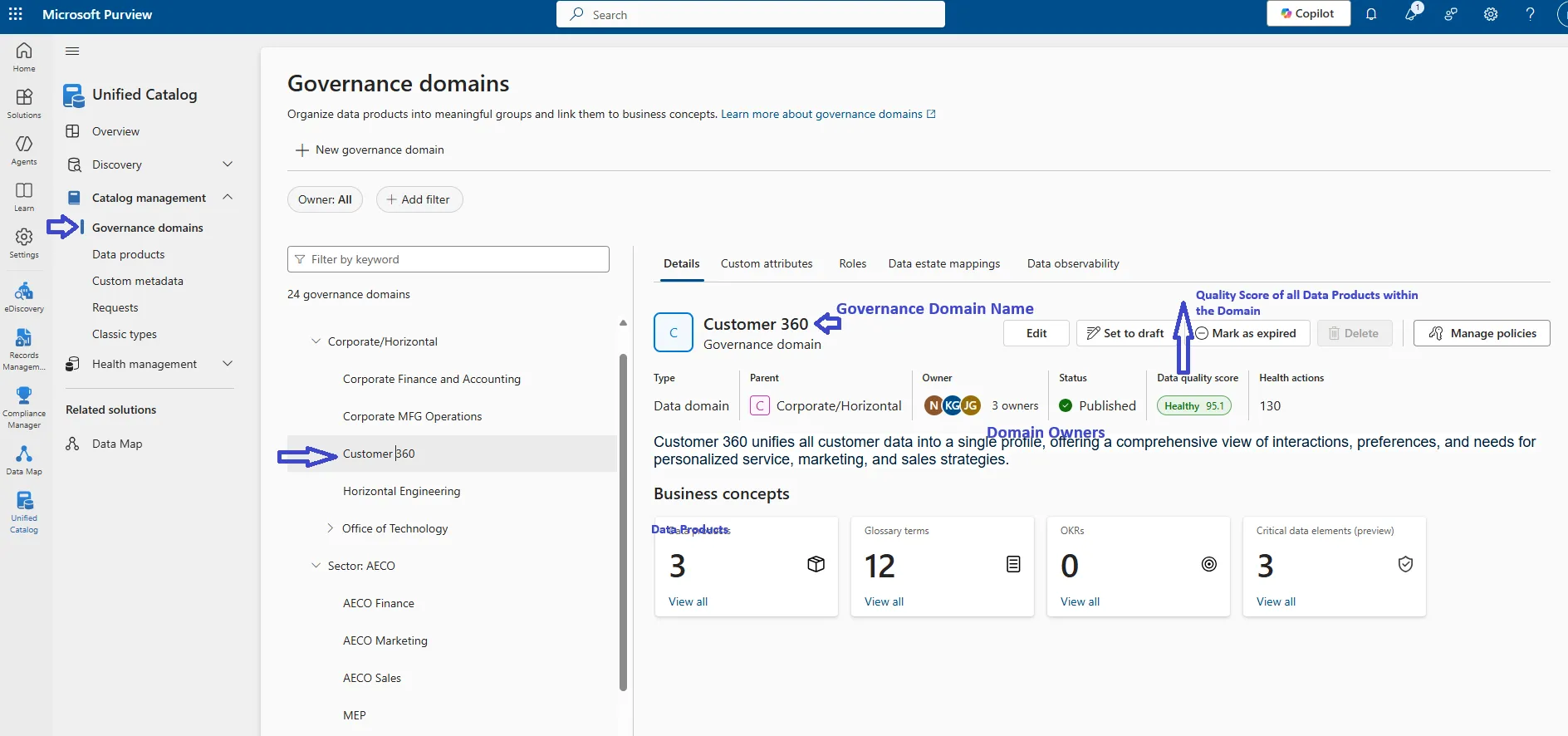
Section titled “4. Governance Domains”Governance Domains in Microsoft Purview Unified Catalog organize data products into meaningful groups, linking them to business concepts based on Trimble’s business structure. Each domain has a name, description, owner, one or more data products, glossary terms, objectives and key results (OKRs), and critical data elements. This structure provides context for data assets and facilitates scalable data governance practices.
Note: Administrative permissions are required to create and publish a governance domain in Microsoft Purview. Please submit a Support Request if you have a need to create a new governance domain or modify an existing one.
Sample Governance Domain.
Section titled “Sample Governance Domain.”Below Screen Capture shows a Sample Governance Domain.
To create a new governance domain in Microsoft Purview’s Unified Catalog, follow these instructions.
Requirements:
Section titled “Requirements:” -
Permissions: Ensure you’re signed in with an administrator account that has the Data Governance Admin role.
-
Consider your organization’s structure: Plan domains and collections to mirror your organization’s data management, security, and governance. Start with a default domain and build a hierarchy.
Steps to Create a new Governance Domain.
Section titled “Steps to Create a new Governance Domain.” -
Open the Microsoft Purview portal: and ensure you have the necessary admin permissions.
-
Navigate to the Unified Catalog.
-
Select Catalog management: from the left-hand menu.
-
Choose Governance domains.
-
Click New Governance domain.
-
Provide basic details: on the dedicated page:
- Name: Enter a unique name for your new domain.
- Description: Add a description to clarify the domain’s purpose.
- Domain type: Select a type from the options provided, such as “Functional unit,” “Line of business,” “Data domain,” “Regulatory,” or “Project”.
- Parent domain (optional): Choose an existing domain as the parent if you want to establish a hierarchy.
-
Select Next: to proceed.
-
Configure custom attributes: on the next page, setting values for any attributes defined by your organization’s administrator.
-
Select Create: to finalize and create the new governance domain.
5. How to Create and Publish Data Products.
Section titled “5. How to Create and Publish Data Products.”
1. Data Product
Section titled “1. Data Product”A data product in Microsoft Purview is a collection of data assets, such as tables, files, and reports, designed for a specific use case and intended for sharing. It’s a business concept defined by its name, description, owners, and a list of associated data assets, and its creation and publication involve several distinct stages.
Creating and publishing data products in Microsoft Purview involves several key steps within the Unified Catalog.
2. Requirements
Section titled “2. Requirements”- Permissions: Data Product Owner role for the governance domain where you’ll be creating the data product.
- A published governance domain. If not, please see the steps on how to create a governance domain.
- Data assets already in the Data Map. If not, please see how to add data assets to Data Map.
3. Creating a Data Product
Section titled “3. Creating a Data Product”To create a new data product, follow these steps in the Microsoft Purview portal:
- Navigate to the Unified Catalog and select Catalog management, then Data products.
- Select New data product.
- Fill in the Basic details: Give the data product a descriptive name and description. The description should provide a clear narrative about the data, its origin, and purpose. Choose a type, and assign owners.
- Fill in the Business details: Associate the data product with a published governance domain. You can also add a use case, which describes how the data is currently used and how it can be applied to other scenarios. You can also mark the product as Endorsed here.
- Custom attributes: If your admin has defined custom attributes, you’ll be able to set their values here.
- Select Create to finalize the process.
4. Add assets to a data product
Section titled “4. Add assets to a data product”To add assets to a data product in Microsoft Purview, follow these steps:
- Open the Unified Catalog in the Microsoft Purview portal.
- Navigate to Catalog management and select Data products.
- Choose the specific data product you want to add assets to.
- On the data product’s details page, select Add data assets. This option is usually located under the description and use cases sections.
- Search for the assets you want to include by using keywords or applying filters.
- Select the assets you want to add to the data product.
5. Publishing a Data Product
Section titled “5. Publishing a Data Product”To make a data product discoverable and manageable in the Unified Catalog, it must be published. However, a data product can only be published if its associated governance domain has also been published.Once your data product is created and appears in the Unified Catalog, you can proceed with the following actions:
- Add data assets: Add relevant data assets (like tables, files, or Power BI reports) to the data product.
- Define terms of use: You can add links to terms of use that users must agree to before requesting access to the data.
- Manage access policies: Set up policies that allow for secure, self-service access to the data product. Users can request access directly from the data product page.
- Publish: Once you’re ready, you can publish the data product, making it available for consumption and use within the organization.
Purview emphasizes treating data as a product with clear ownership, metadata, quality rules, and defined access workflows.This product-based delivery model emphasizes the importance of upstream modeling for data governance.You can learn how to create a data product in Microsoft Purview using this video.
6. Enterprise Glossary:
Section titled “6. Enterprise Glossary:”The enterprise glossary, a foundational element of the Unified Catalog, and it is organized by distinct business domains. Consequently, each term within the enterprise glossary is affiliated with a specific governance domain, facilitating its applicability to data products and various other business constructs. This methodology emphasizes the provision of comprehensive business context, extending beyond mere linkage to technical assets.

There are 3 main Components in Enterprise Glossary
-
Glossary Term
-
Critical Data Items
-
OKRs
1. Glossary Term
Section titled “1. Glossary Term”Glossary terms represent distinct concepts that define an organization’s business, processes, and systems. These terms are established within governance domains to create context relevant to each segment of an organization. Upon creation, these terms are then mapped to data products, providing contextual information and facilitating specific data governance based on business context.
Prerequisites
Section titled “Prerequisites” -
Any users can read published glossary terms.
-
To create and edit glossary terms, you need the steward role.
Steps to Create Glossary Term:
Section titled “Steps to Create Glossary Term:” -
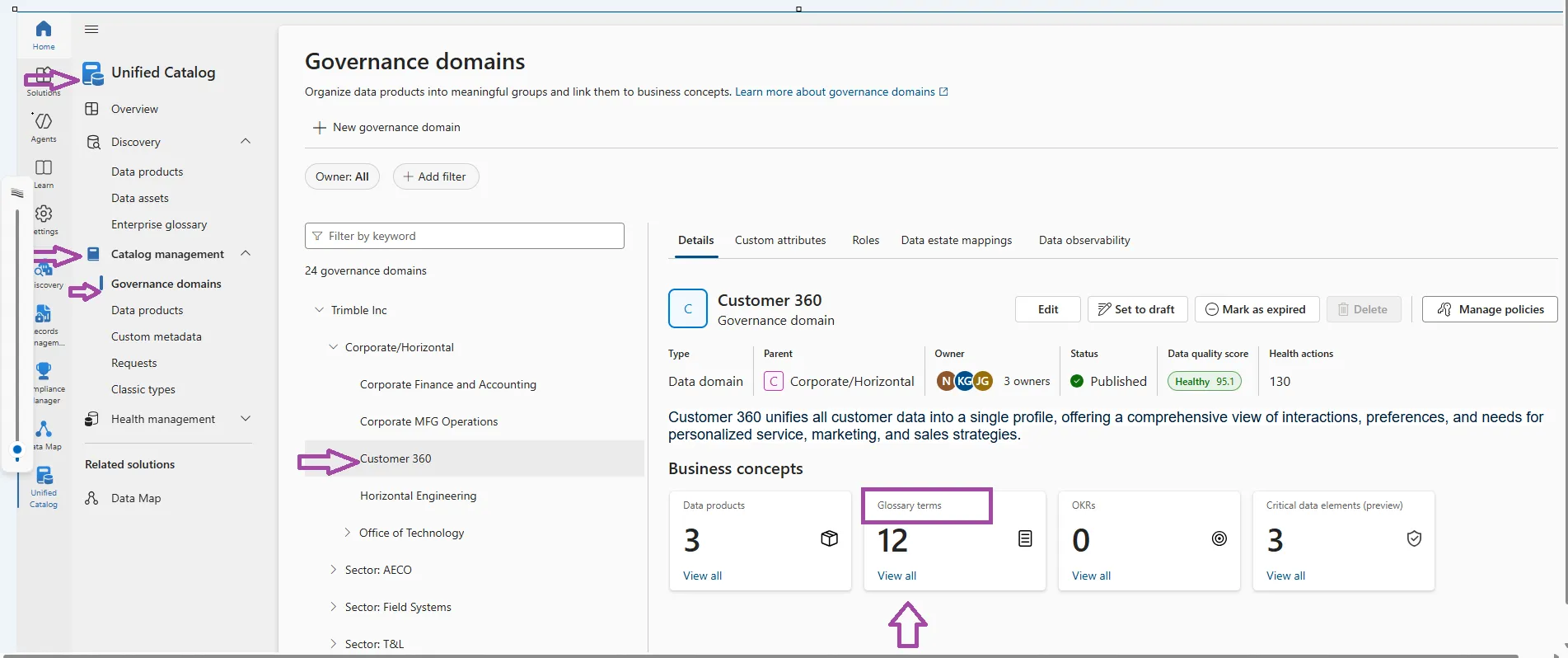
In Unified Catalog, select Catalog management, then select Governance domains.
-
Select the desired governance domain.
-
On the “Details” tab, find the “Glossary terms” card and select “View all.”
-
To create a new term, select “New term.”
-
Fill in the “Basic details” including a name and definition, an owner, and an optional parent term.
-
Add any related acronyms on the “Acronyms” page.
-
Add any related resources on the “Resources” page.
-
Set values for any “Custom attributes” on the “Custom attributes” page, ensuring all required fields are completed.
-
Select “Create” to finish.
Your term is created in a draft state, where only stewards and domain owners can see it. To make it visible to all users, you need to publish the term.
Steps to Publish Glossary Term:
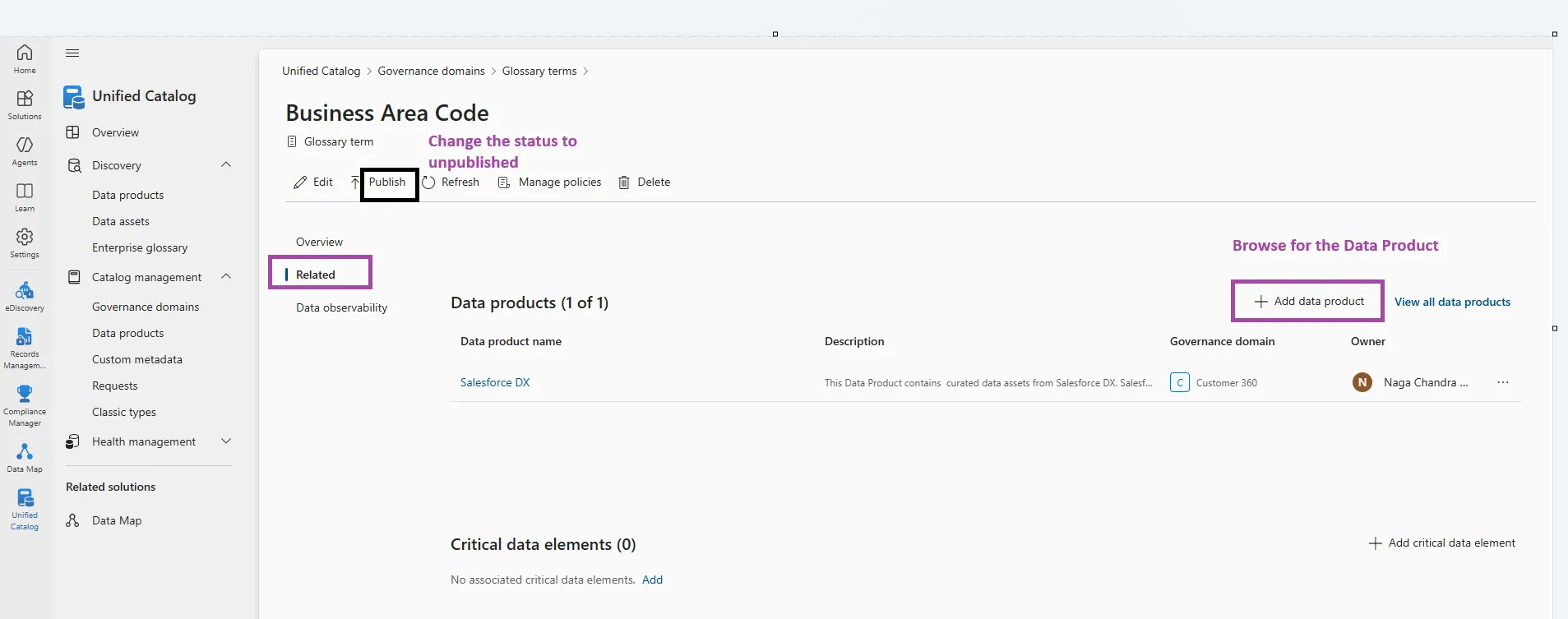
Section titled “Steps to Publish Glossary Term:”Once your term is ready to be used in your governance domain, you can publish your term by:
-
Select the domain where your term resides.
-
Select the Glossary terms button.
-
Search or browse for the glossary term and select it.
-
Select the Publish button next to the Edit button.
Add data product link to Glossary Term
Section titled “Add data product link to Glossary Term” -
Select the governance domain where the Glossary term resides.
-
Select the Glossary terms button.
-
Search or browse for the glossary term and select it.
-
Select the Related tab.
-
To link the Glossary term to a data product, select the + Add data product button.
-
Search for the data product, or data products, you want to link and select them.
-
To add your selected data products, select Add.
2. Critical data elements
Section titled “2. Critical data elements”Critical data elements in Microsoft Purview Unified Catalog are created within governance domains These are a logical grouping of important columns across tables in the data sources that you can use to focus your efforts.
These columns should be critical pieces of information that are necessary for decision making and so need to be governed with the highest care
For example: A “Customer ID” critical data element can map “CustID” from one table and “CID” from another table into the same logical container. Users can match this value across data assets to make connections, and when data producers create a new asset they can use this element as a blueprint to provide quality information in the correct format.
Requirements
Section titled “Requirements” -
To create critical data elements and add columns to it, the user must have data steward and data product owner permissions.
-
To access data assets in the data map, users require at least data reader permissions on the collection where the asset is located.
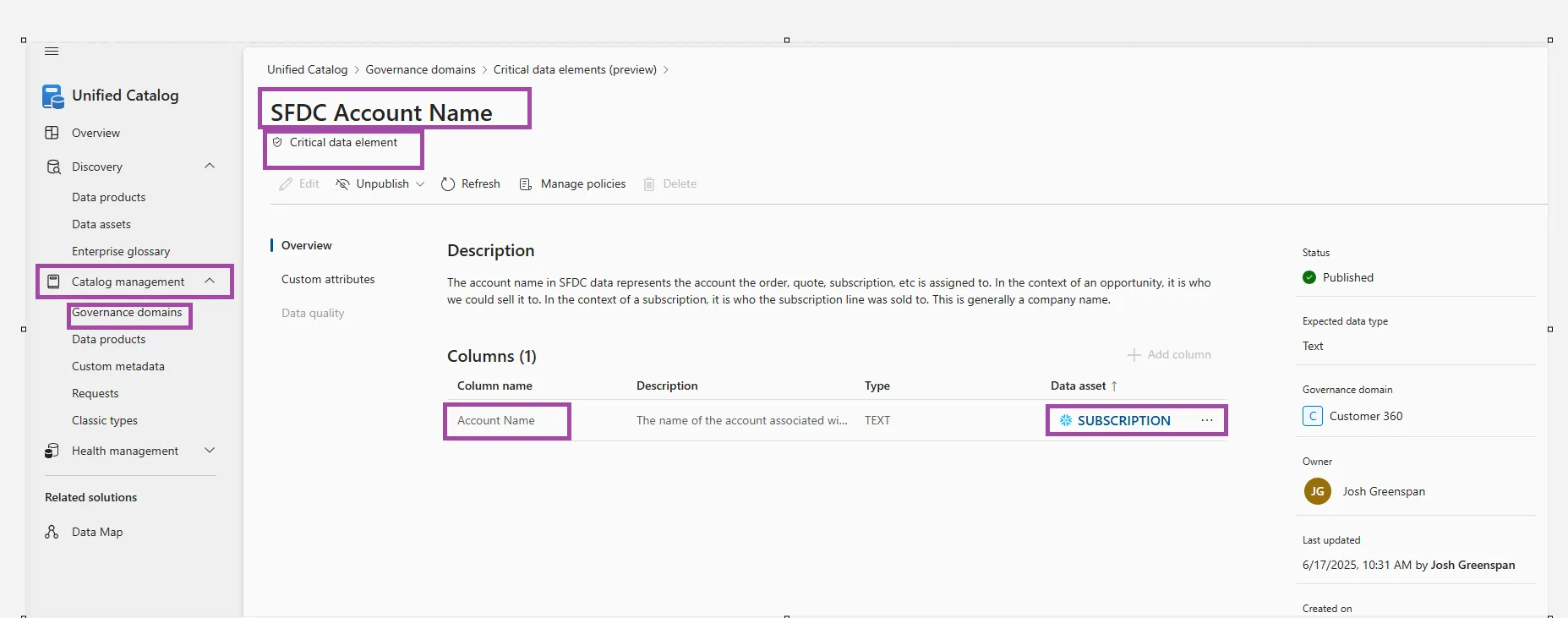
Create critical data Element
Section titled “Create critical data Element”
-
In Unified Catalog, select Catalog management, then select Governance domains.
-
You see a list of all the governance domains you have access to based on your permissions. Select the governance domain where you want to add critical data.
-
On the Details tab, find the Critical data elements card and select View all.
-
Select New critical data element.
-
On the Basic details page, enter a name for your critical data. If you use a name that already exists, you’ll see a warning during the creation process. While duplicating names isn’t recommended, you won’t be blocked from using a duplicate name.
-
Add a description, owner, and select an expected data type. Then select Next.
-
On the Custom attributes page, you can set values for all custom attributes defined by your admin in the Custom attributes section of the catalog. If the attribute is marked as required, you need to fill out all values on this page before you can complete the process.
-
When done, select Create.
Add columns
Section titled “Add columns”Once you create your critical data, you can add data columns to map critical columns from your assets to this logical concept.
-
Select your critical data element from the list of critical data elements in your governance domain.
-
Select the + Add column button.
-
Search for your data sources using keywords and filters, and select a data source.
-
In that data source, select any relevant column.
-
Select Add.
-
Now you should be able to see all your columns mapped to your critical data element.
-
Repeat for any number of data sources and columns.
Below the columns you’ve added, you’ll also now see the list of data products that are associated with the assets you’ve added to your critical data element.
3. OKR
Section titled “3. OKR”What is an OKR
Section titled “What is an OKR”An Objective and Key Result (OKR) defines the goal or desired outcome of a governance domain, such as a 10% increase in sales or a 3% decrease in support cases. Objectives should be aligned with all organizational activities and demonstrate how outcomes are achieved.
Note: Trimble utilizes alternative tools, such as Workboard, for OKR management. While your group is welcome to utilize Purview, we do not recommend it as a substitute for Trimble’s standard OKR management tool.
7. Data Quality
Section titled “7. Data Quality”In Microsoft Purview, quality refers to data quality and metadata quality within the Unified Catalog. Data owners and stewards define rules and run scans to assess the accuracy, reliability, and fitness for the purpose of data assets. This involves creating and running data quality scans, which generate health scores and identify specific issues.
- To manage data quality rules, users need the data quality steward role.
- To view existing quality rules, users need the data quality reader role.
Available data quality rules
Section titled “Available data quality rules”Microsoft Purview Data Quality enables configuration of the below rules, these are out of the box rules that offer low-code to no-code way to measure the quality of your data.
| Rule | Definition |
|---|---|
| Freshness | Confirms that all values are up to date. |
| Unique values | Confirms that the values in a column are unique. |
| String format match | Confirms that the values in a column match a specific format or other criteria. |
| Data type match | Confirms that the values in a column match their data type requirements. |
| Duplicate rows | Checks for duplicate rows with the same values across two or more columns. |
| Empty/blank fields | Looks for blank and empty fields in a column where there should be values. |
| Table lookup | Confirms that a value in one table can be found in the specific column of another table. |
| Custom | Create a custom rule with the visual expression builder. |
Data quality life cycle:
Section titled “Data quality life cycle:”-
Assign users(s) data quality steward permissions in Unified Catalog to use all data quality features.
-
Register and scan a data source in your Microsoft Purview Data Map.
-
Add your data asset to a data product.
-
Set up a data source connection to prepare your source for data quality assessment. For Quality profile, Purview uses a separate data source connection.
-
Configure and Run Data Profiling
- Configure and run data profiling for an asset in your data source.
- When profiling is complete, browse the results for each column in the data asset to understand your data’s current structure and state.
-
Set up data quality rules based on the profiling results, and apply them to your data asset.
-
Configure and Run Data Quality Scan
- Configure and run a data quality scan on a data product to assess the quality of all supported assets in the data product.
- Review your scan results to evaluate your data product’s current data quality.
-
Repeat steps 5-8 periodically over your data asset’s life cycle to ensure it’s maintaining quality.
-
Continually monitor your data quality.
- Review data quality actions to identify and resolve problems.
- Set data quality notifications to alert you to quality issues.
View existing data quality rules and their setup.
Section titled “View existing data quality rules and their setup.”-
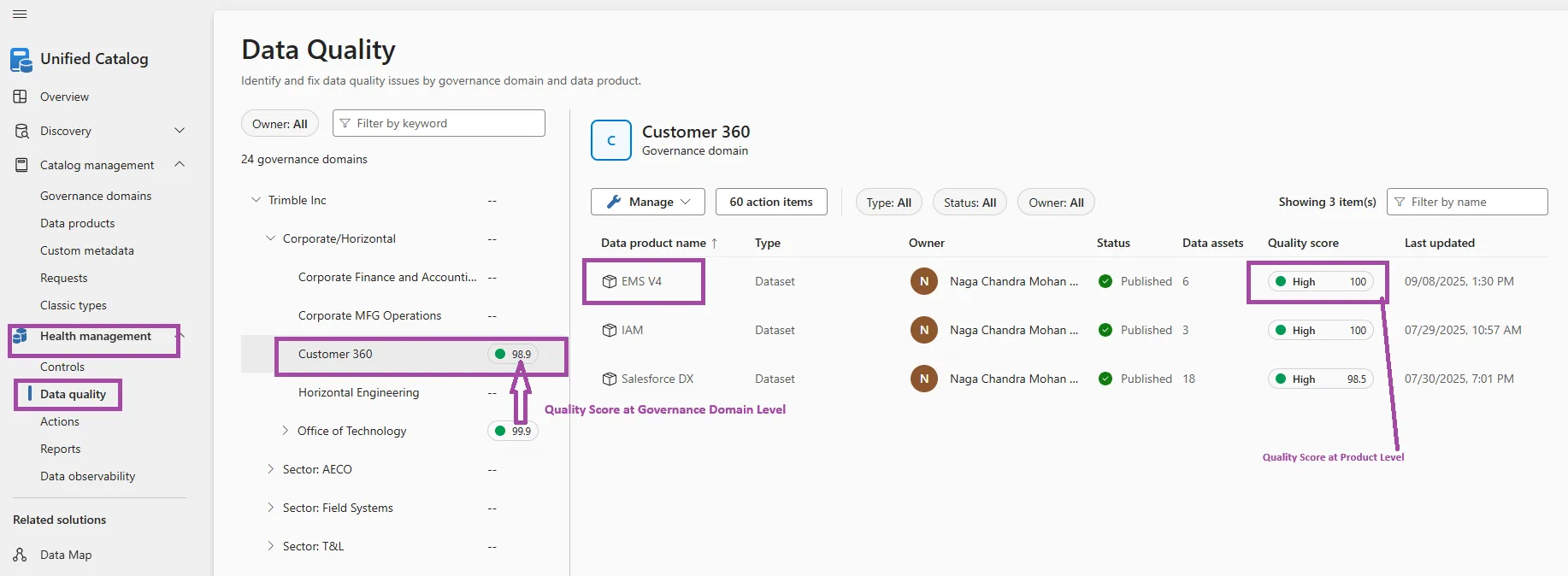
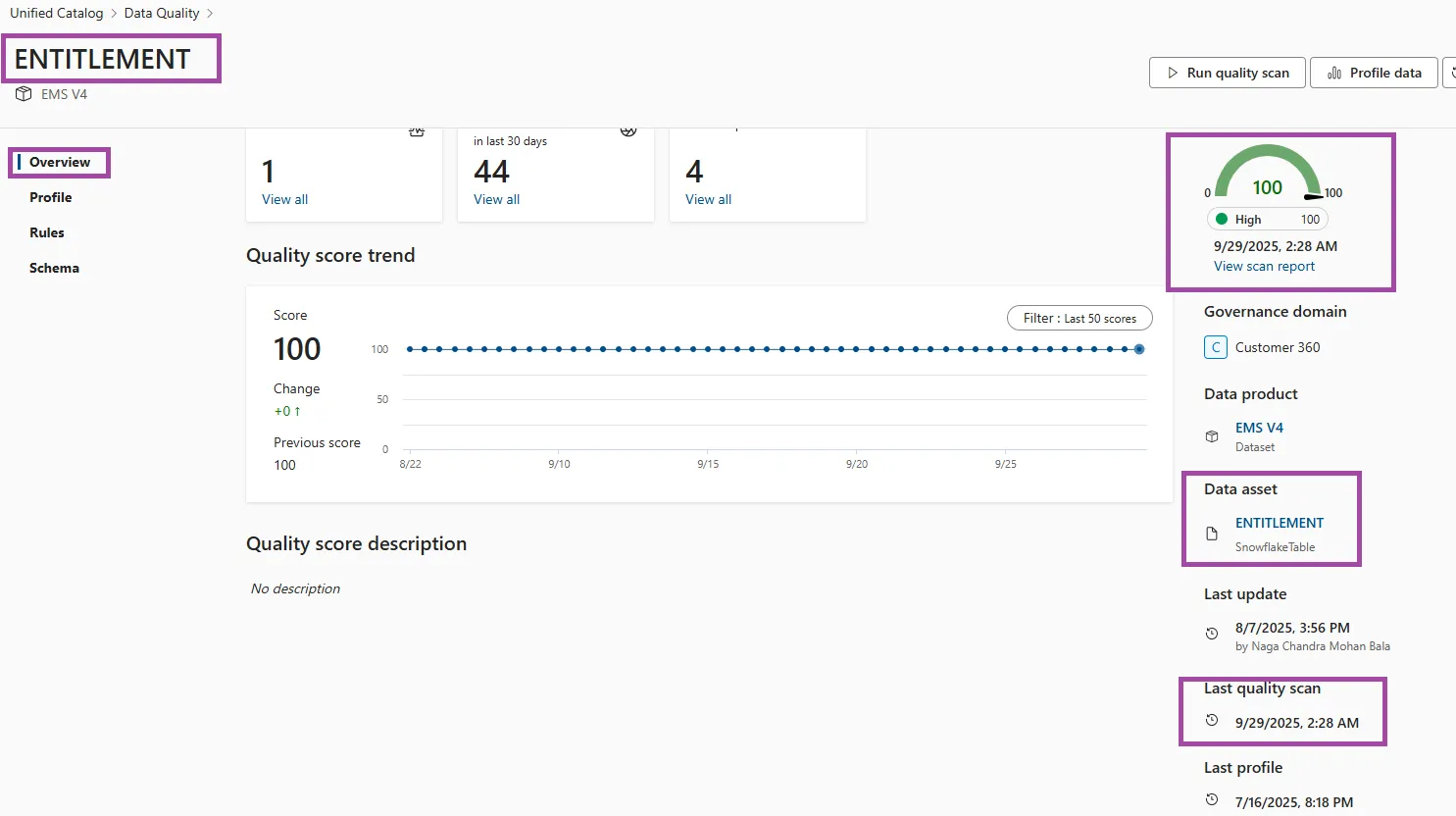
From Microsoft Purview Unified Catalog, select the Health Management menu and Data quality submenu.
-
In the data quality submenu, select governance domain “Customer 360”
-
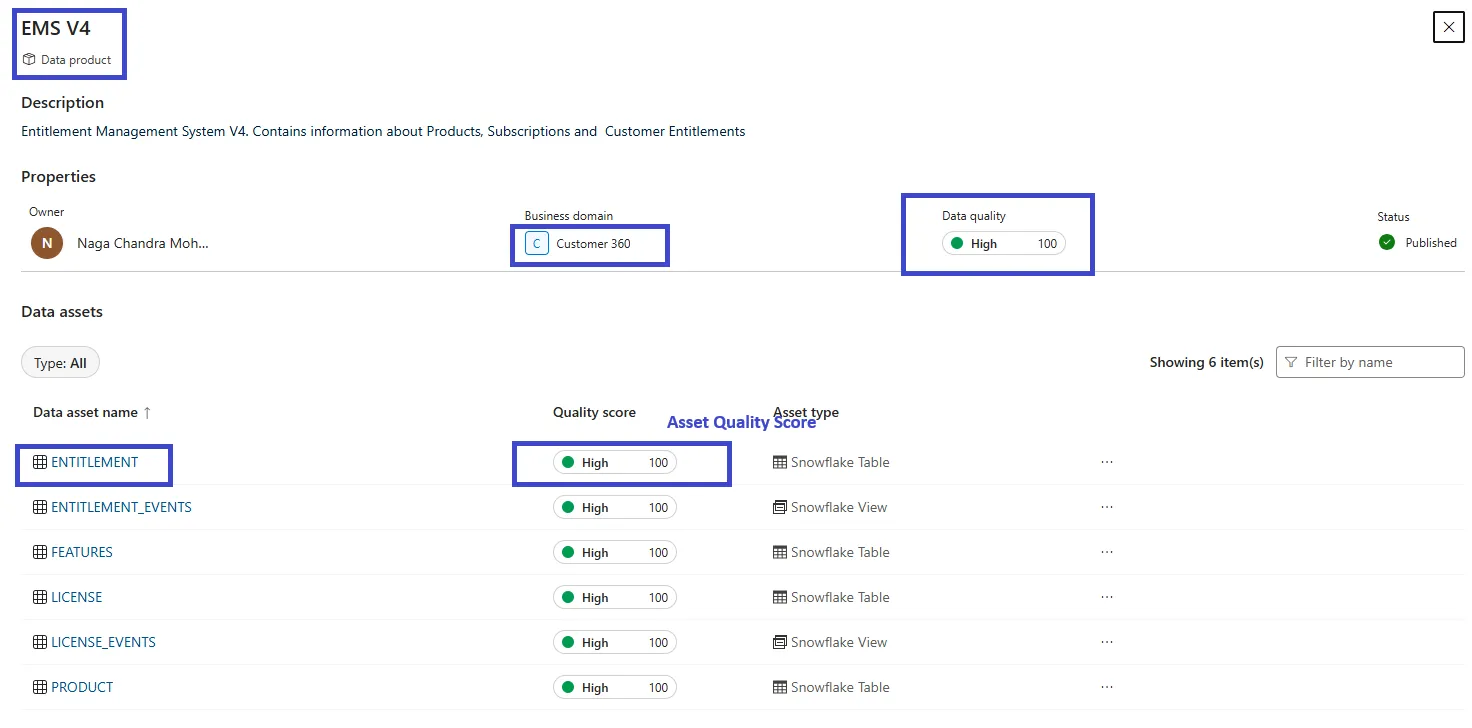
Select the data product “EMS V4”
-
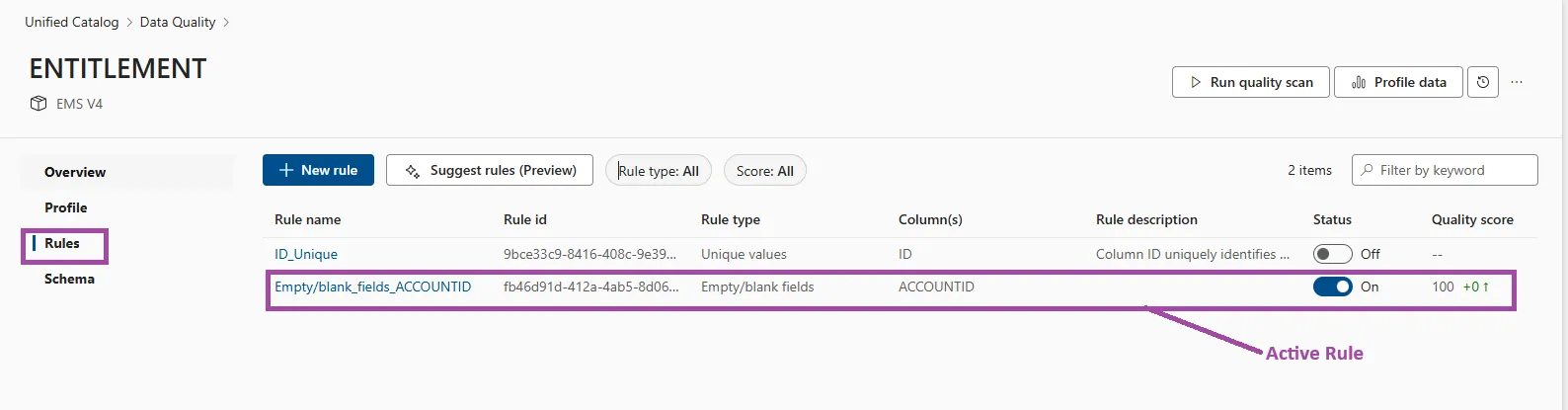
Select the Asset “ENTITLEMENT”
-
Review the Asset Quality Score, Quality Rules, History of the quality score and its scan times.
Data Quality Manage Options:
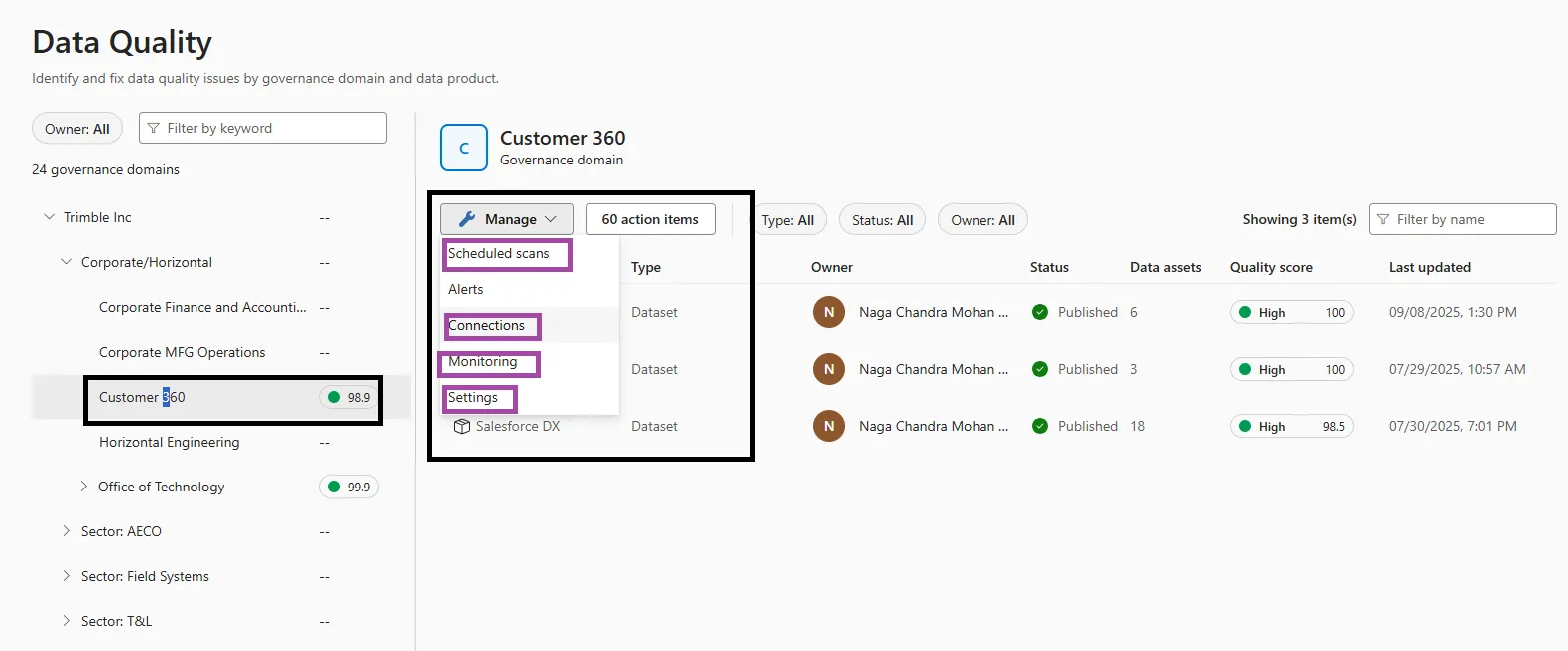
Section titled “Data Quality Manage Options:”Microsoft Purview provides extensive data quality management capabilities through its Unified Catalog and Health Management solutions. The following image illustrates the various options available for managing an asset’s quality profile.
8.Data Map:
Section titled “8.Data Map:”Data Map is a tool for capturing metadata about data assets from various sources. It is primarily used by Data Producers to register, scan, and curate data assets.
Within the Data Map, data is structured into collections, and permissions are assigned at the collection level. Should a new collection be required, or if you require additional permissions to an existing collection are necessary, please submit a Support ticket.
A Microsoft Purview Data Map Administrator is a user role that has administrative permissions related to the Microsoft Purview Data Map. The responsibilities of a Data Map Administrator can be divided into a few key areas:
Data Source Management:The Data Map Administrator manages Purview’s data sources and scans, registering new sources like Azure SQL Databases or Amazon S3 buckets and configuring automated scans to extract technical metadata, apply classifications, and capture lineage. This information is then ingested into the Data Map, creating a detailed, searchable, and interconnected map of data assets.
Collection and Domain Management: This role can create, edit, and manage domains and collections, which are used to organize data assets and control access.
Role Assignments: A Data Map Administrator, specifically a Collection Admin or Domain Admin, can assign roles to other users within a collection or domain. This allows them to delegate responsibilities and control who can access and manage specific data assets.
Enabling Governance: Upon population of the data map, data owners and stewards are enabled to enrich the metadata with business terms and descriptions through a unified data catalog. Concurrently, data consumers can readily locate, comprehend, and utilize the data for their respective tasks.
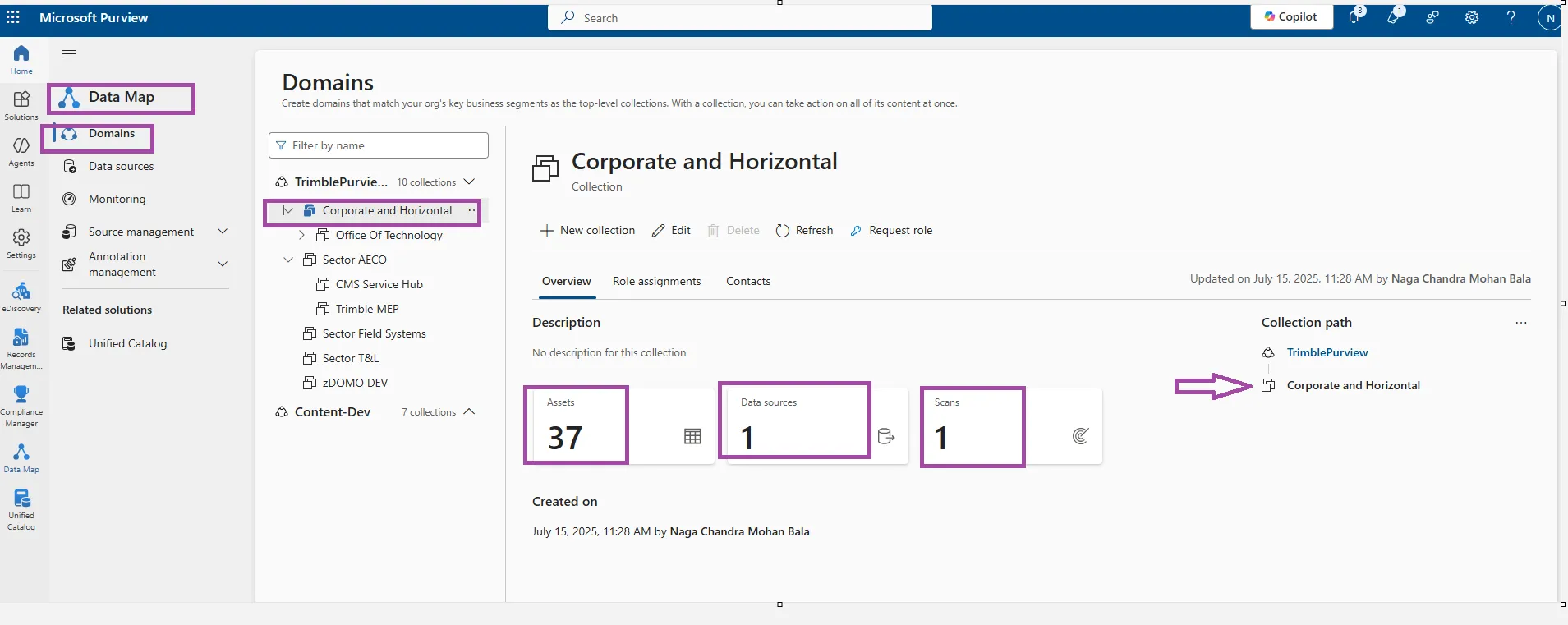
Purview Data Map Collection, Hierarchy, Data Sources, Scan and Assets
Data Source Connections in Purview Data Map:
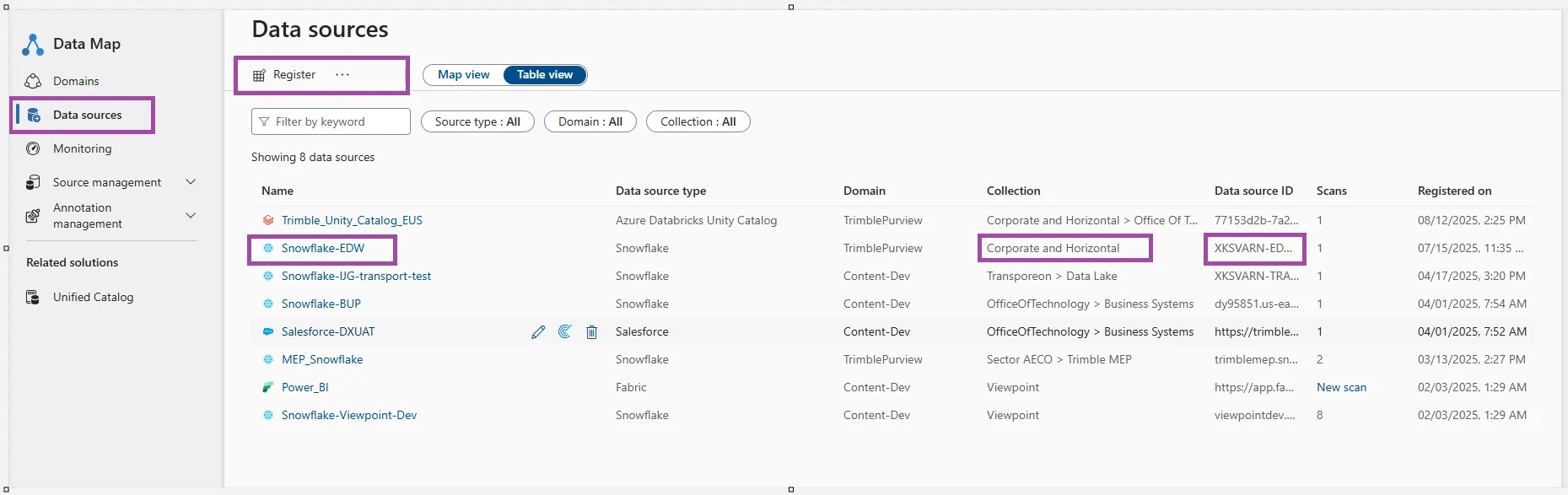
Please refer to Microsoft Purview’s online help for instructions on registering new data sources and executing scans.
For further questions regarding the Purview Data Catalog or Data Map, please submit a Support Request.select BI/Datawarehouse for application and Microsoft Purview for Module.