
Repository Structure
The repository is designed with a consistent structure that is intended to be easy to approach as either a contributor or a team member. Structure of the repository follows language-specific guidelines.
Repositories are named according to the language:
- tcp-sdk-for-net (C#)
- tcp-sdk-for-js (JavaScript)
- tcp-sdk-for-python (Python)
- tcp-sdk-for-java (Java)
The folder structure of the SDK repository is organized into build, sdk, and samples at the top level:
- /build - Scripts to build, test, and deploy the package libraries into a package management system
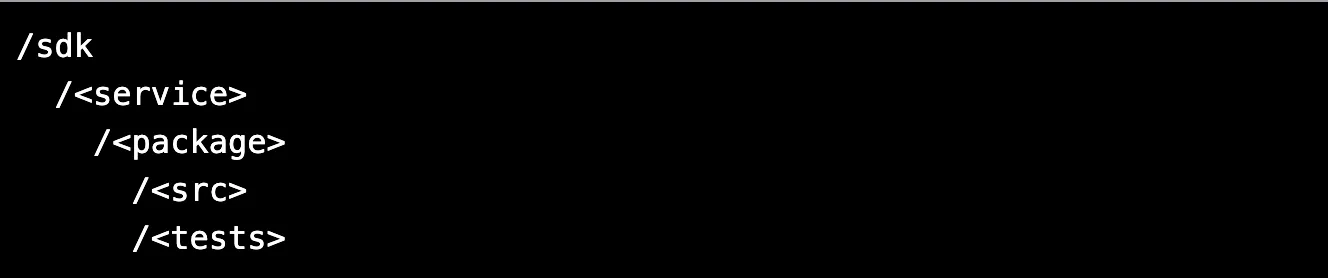
- /sdk - Primary SDK source code folder for each service components
- /samples - Code samples in the form of short code snippets and sample applications
The following documentation exists as markdown files in the root folder, and describe the guidelines of that language-specific SDK.
- README.md - Answers the what, why, and how of the project
- GETTING_STARTED.md - Contains information about practices of the development environment, code coverage, documenting the comments, and more
- CODE_OF_CONDUCT.md - Explains how to engage and address any problems among the members of project community
- CHANGE_LOG.md - Describes the what activities have occurred in the repository, with version number and release notes
- SUPPORT.md - Explains how to file issues and get help
The /sdk folder contains folders for each service, which in turn contain folders for each package that is associated with that service.
Repository Branching
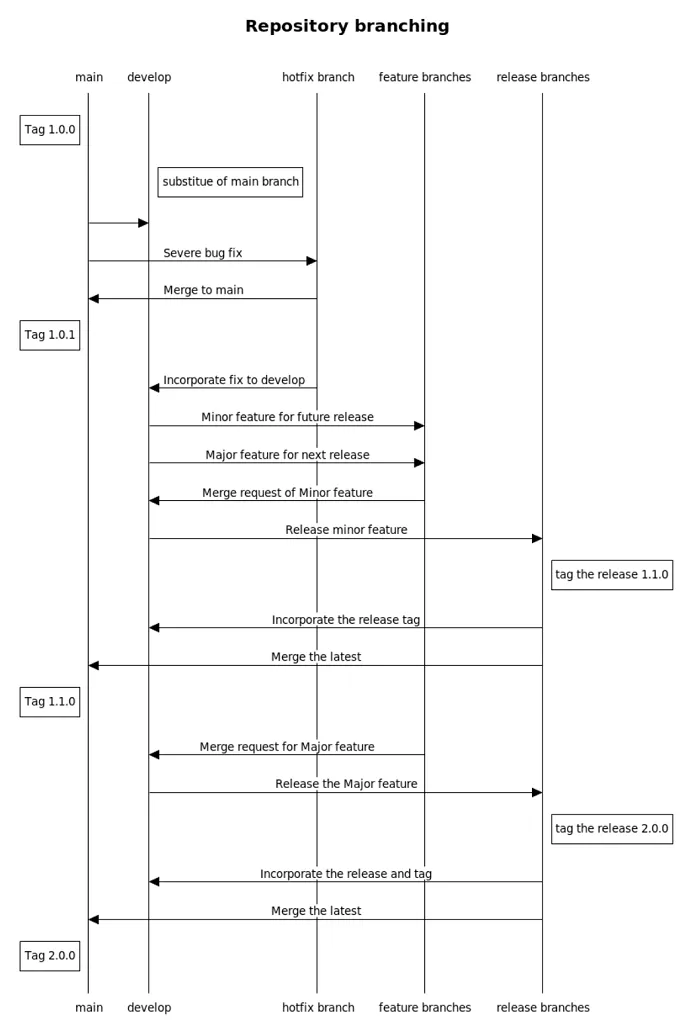
Section titled “Repository Branching”The Trimble Cloud Platform SDK repository follows GitFlow branching strategy. Before raising a pull request, developers should:
- Take a branch from the the develop branch and work on the feature or bugfix. Rebase the code.
- To reduce the clutter of branches and to enable a common workflow, contributors should create forks of the develop repository and work in the forks. Once work is ready in the fork then a pull request can be submitted back to the develop repository.
The following diagram illustrates the branching workflow for the Trimble Cloud Platform SDK repository:
Main Branches
Section titled “Main Branches”The main repository branches are:
- main - It is default branch that exists perpetually and must always be in a working state.
- develop - This branch has the same role as master; it always reflects the latest delivered development changes for the next release.
Feature Branches
Section titled “Feature Branches”Features should be branched off from develop and kept in a local or forked repository. The branch naming is as follows:
feature/<feature_name>Once the work is ready, rebase the changes on top of develop branch and submit a pull request to the develop branch.
Hotfix Branches
Section titled “Hotfix Branches”Under some circumstances we may need to service a specific version of the code with a hotfix. In these cases, we create a branch off from main and name the hotfix branch as follows:
hotfix/<hotfix_name>Release Branches
Section titled “Release Branches”This branch is for the preparation of release packages. Branch the release branch from develop and then merge back to both develop and master along with tags. A release branch should be named as follows:
release/<release_name>Once the release is shipped with a new version, the SDK team deletes the particular release branch.